

In today’s fast-moving digital world, PDFs are everywhere — from office documents and study materials to invoices, resumes, and eBooks. But opening a PDF shouldn’t require heavy software, paid apps, or account sign-ups. That’s where Bxcode’s Online PDF Reader comes in.
With Bxcode PDF Reader, you can view and read PDF files instantly in your browser. No downloads, no registration, and no complicated steps. Just upload your PDF and start reading within seconds.
What Is an Online PDF Reader?
An online PDF reader is a web-based tool that lets you open and view PDF files directly in your browser. Instead of installing software like Adobe Reader or other apps, you can simply visit the tool, upload your file, and read it online.
Bxcode’s PDF Reader is designed for speed, simplicity, and privacy. It works on desktop, tablet, and mobile devices, making it easy to access your documents anytime, anywhere.
Why Use Bxcode PDF Reader?
Many PDF tools available online come with limitations. Some require sign-ups, some show too many ads, and others upload your files to their servers, which can raise privacy concerns. Bxcode PDF Reader solves these problems.
Here’s why users prefer Bxcode:
- You don’t need to create an account or log in
- You don’t need to install any software
- Your PDF opens instantly in the browser
- Your files remain private and secure
- The tool works smoothly even with large PDF files
Whether you’re a student reading notes, a professional reviewing documents, or a freelancer checking invoices, Bxcode makes PDF viewing quick and hassle-free.
What Makes Bxcode PDF Reader Different from Other Tools?
There are many PDF readers available online, but Bxcode focuses on three important things: speed, privacy, and user experience.
Unlike many tools that upload your PDF to a server, Bxcode processes your file directly in your browser. This means your document never leaves your device, which is safer for sensitive files.
Bxcode PDF Reader also offers a modern reading experience. You get smooth scrolling, easy page navigation, zoom controls, fullscreen mode, and the option to download your file again. The interface is clean and simple, so even first-time users can use it without any learning curve.
Another big difference is that Bxcode is completely free and does not force you to sign up. No email, no verification, no hidden limits — just open your PDF and read.
How to Use the PDF Reader (Step by Step)
Using Bxcode PDF Reader is very simple. You can open and read your PDF in just a few steps:
Step 1: Upload Your PDF
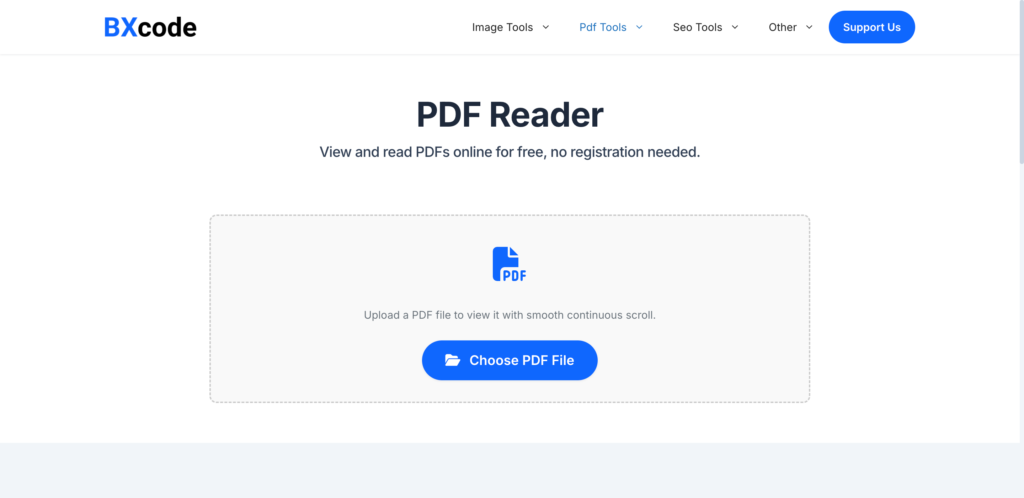
Open the PDF Reader tool on Bxcode and click on the “Choose PDF File” button. Select the PDF file from your device that you want to read.
Step 2: View and Read Your PDF
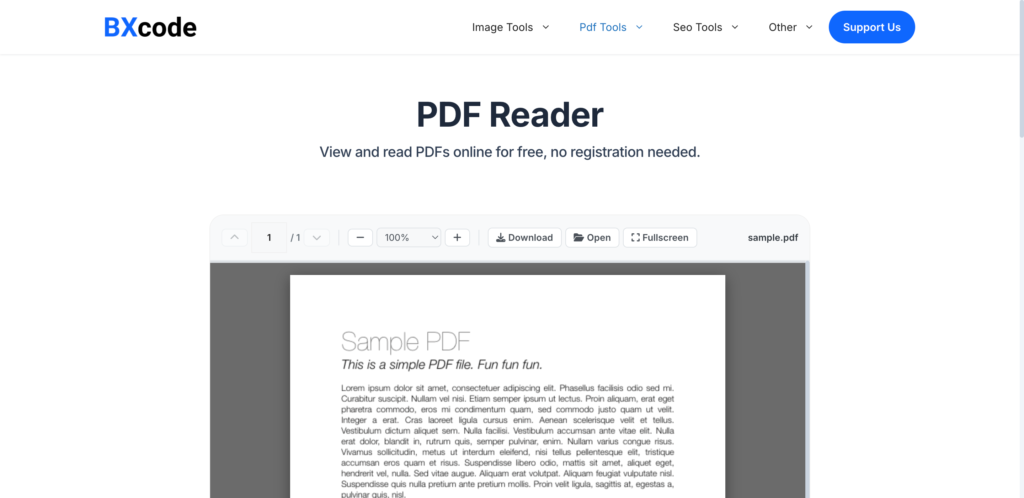
Once your file is uploaded, the PDF will open instantly in the viewer. You can scroll through pages, zoom in or out, jump to specific pages, or switch to fullscreen mode for comfortable reading.
Step 3: Download or Open Another PDF
After reading, you can download the same PDF file again if needed. You can also open another PDF anytime without refreshing the page.
That’s it — no extra steps, no waiting, and no technical setup.
Key Features of Bxcode PDF Reader
Bxcode PDF Reader comes with useful features that make reading PDFs easy and comfortable:
- Fast PDF loading with smooth scrolling
- Zoom in, zoom out, and fit-to-width options
- Page navigation with previous and next controls
- Fullscreen reading mode
- Works on mobile, tablet, and desktop
- No sign-up or installation required
- Privacy-first design
These features are built to give you a clean and distraction-free reading experience.
Who Can Use This Tool?
Bxcode PDF Reader is useful for many types of users:
Students can read notes, books, and assignments online.
Professionals can quickly review documents, reports, and contracts.
Freelancers can open invoices and client files on the go.
General users can read eBooks, forms, and guides without installing apps.
If you work with PDFs in any form, this tool can save you time and effort.
Is Bxcode PDF Reader Safe?
Yes, Bxcode PDF Reader is safe to use. The tool runs directly in your browser, which means your PDF files are not stored on Bxcode servers. This reduces privacy risks and makes it suitable for viewing personal or sensitive documents.
You stay in control of your files at all times.
Final Thoughts
Bxcode’s Online PDF Reader is built for people who want a fast, simple, and privacy-friendly way to read PDF files online. No software installation, no sign-up, and no complicated steps — just upload your PDF and start reading.
If you’re tired of heavy PDF apps or slow online tools, Bxcode PDF Reader is a clean and reliable alternative you can use anytime.
Try the PDF Reader on Bxcode today and experience how easy reading PDFs can be.

Bxcode
We're Bxcode Team, a group of digital creators and developers who are passionate about developing free online tools that can be easily utilized by everyone. We also share tips on working smarter and faster!
Related Post
No latest posts found.